.png?width=147&height=34&name=POS-Nation-Logo-Main%20(1).png)




Liquor Inventory Software: Top 5 POS Providers for 2026
If you’ve ever opened your point of sale (POS) reports, scrolled for 30 seconds, and thought “Cool… but what do I do with this?” — you’re not alone. Mike, who owns a single neighborhood shop, checks daily sales. Sara, who manages three locations, glances at weekly numbers. Both are running solid liquor stores. But neither wants to become a data scientist just to improve profits.
Which liquor store metrics actually matter isn’t about vanity numbers or charts that look impressive in meetings. It’s about a short list of key performance indicators (KPIs) that affect cash flow, margins, and inventory headaches — and how liquor POS analytics highlights those insights without extra work.
Here are the liquor store KPIs worth paying attention to, and what they tell you about your business.
The Problem With “All the Data”
Most liquor store owners already review reports, including total daily sales, weekly revenue, and top-selling SKUs. The issue isn’t lack of data — it’s lack of signal.
You don’t need 40 metrics. You need five top KPIs that help you:
-
Identify what’s driving profit.
-
Expose inventory tying up cash on the shelf.
-
Decide what to reorder — and what to stop carrying.
Once your focus is on the right numbers, analytics stop feeling intimidating and start being useful.
Which Liquor Store Metrics Actually Matter (the Short List)
Liquor POS systems generate dozens of reports, but only a handful influence day-to-day decisions. Here are the core liquor store KPIs that move profit — not just numbers on a screen.
1. Sales by Category (Not Just Total Sales)
Total sales tell you how busy you are — $45,000 in sales this week. Sales by category tell you where that $45,000 is coming from.
Liquor stores typically categorize sales by beer, wine, spirits, ready-to-drink (RTD) beverages, and accessories/mixers. Here’s the classic example every experienced owner recognizes:
Beer sells the most units, but spirits drive the margin.
Beer may dominate in volume, but spirits often carry higher margin percentages and a lower risk of spoilage. Without category-level reporting, owners often overfocus on what moves fastest instead of what pays best.
POS analytics shows category sales trends so you can:
-
See seasonal shifts (beer spikes versus spirits stability).
-
Identify underperforming categories.
-
Adjust shelf space intentionally.
That clarity enables you to balance volume and margin, rather than guess which categories deserve more space, attention, and inventory dollars.
2. Margin Percentage (the Reality Check KPI)
Revenue is ego. Margin is survival.
Margin percentage answers the question: “How much do I actually keep after the sale?”
Two SKUs can generate the same revenue — but wildly different profits. For example, a 40-pack of craft beer and a mid-shelf spirit may both be priced at $40, but with margins of 20% and 50%, you keep $8 on one sale and $20 on the other.
Tracking margin by category, brand, and SKU helps you:
-
Promote high-margin items.
-
Reconsider low-margin space hogs.
-
Set accurate pricing.
This is one of the clearest answers to which liquor store metrics actually matter, because margin connects analytics to profit — not just activity.
3. Inventory Turnover Rate (Cash on the Shelf)
Inventory turnover tells you how often products sell through and get replaced. Typically, high turnover equals cash moving, while low turnover equals cash trapped.
Liquor stores thrive or falter based on their inventory discipline. Too much slow-moving stock drains your bank account, even if sales look fine.
With POS-driven turnover reports, you can:
-
Identify dead stock early.
-
Reduce overbuying.
-
Improve cash flow without increasing sales.
This KPI transforms inventory from a guessing game into a strategic approach.
4. Reorder Frequency (the “Am I Buying Too Often?” Metric)
Many owners reorder based on habit. That often means placing an order every Tuesday, when the shelves look low, or when the distributor calls.
Reorder frequency tied to actual sales data shows:
-
Which products need tighter reorder cycles
-
Which ones can be ordered less often
-
Where auto-reorder rules save time
POS systems with built-in analytics flag reorder patterns automatically, helping owners avoid both stockouts and overstock — without micromanaging inventory.
5. Average Basket Size (Upsell Without Being Pushy)
Average basket size answers: “How much does each customer spend?”
A slight increase here often has a greater impact than chasing new customers, as it raises revenue without increasing traffic or labor.
When you track average basket size over time, you can:
-
Measure whether merchandising changes are working.
-
Compare performance by time of day or day of week.
-
Identify categories that lift or drag down per-transaction spend.
For example, Mike watches the average basket sit at $28, then jump to $40 during a mixer promotion. That tells him the pairing works — so he reruns it and suggests add-ons at checkout.
When POS analytics show basket size by time of day or category, owners can make smarter merchandising decisions that improve their bottom line.
Sample Dashboard: Showing Which Liquor Store Metrics Actually Matter
POS dashboards can look dense at first glance. The value isn’t in reading every column — it’s in knowing what questions each report answers and how to notice patterns quickly.
Reading the Item Sales Report
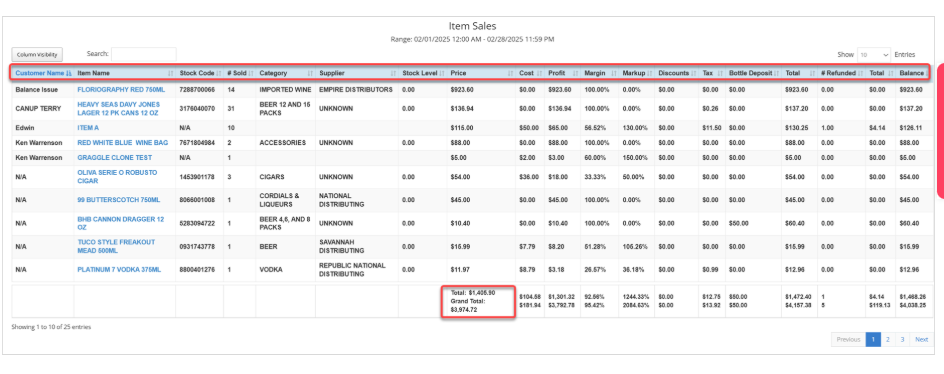
This view is about individual product performance.
The demo report shows that Floriography Red 750ml sold 14 units for $923.60, resulting in a $923.60 profit and a 100% margin. Platinum 7 Vodka 375ml sold one unit for $11.97, with $3.18 in profit and a 26.57% margin.
This contrast shows which SKUs contribute to profit and which do not. That visibility helps you decide what to reorder, what to reprice, and what may not deserve its current space.
Reading the Category Sales Report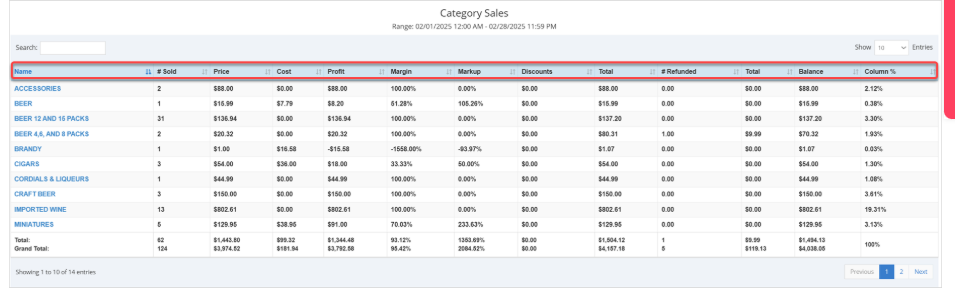
This view is about sales mix and balance.
The sample report indicates that Imported Wine generated $802.61 in sales across 13 units, with a profit of $802.61 and a 100% margin. Beer (12 and 15-packs) sold 31 units for $136.94, resulting in a profit of $136.94 despite the higher volume.
This comparison clarifies where profit originates versus where sales activity is concentrated, informing decisions about inventory, space, and promotional strategy.
Focus on the Liquor Store Metrics That Actually Matter
Ultimately, understanding which liquor store metrics truly matter and how to measure them is crucial to running a successful business. The win isn’t memorizing reports — it’s knowing which numbers deserve attention and letting your POS system do the heavy lifting.
POS Nation is built for that kind of clarity. With liquor-specific solutions like Bottle POS, owners can track sales mix, margins, inventory movement, and basket size accurately, eliminating the need for manual spreadsheets or guesswork.
For more on how top-performing stores use data day to day, download our Liquor Store Analytics Guide.
Good stores watch sales. Great stores watch the numbers that control cash flow. Schedule a demo with POS Nation to see how the right system helps turn raw KPI insights into real profit.


With 12 years in the POS industry, Cort's journey as President of POS Nation parallels the transformation from legacy systems to cloud-based solutions. During this evolution, he recognized that inventory management remained a persistent challenge for store owners. His strategic decision to specialize in key industries has set POS Nation apart from broader market players. By developing deep expertise in specific retail sectors, his team delivers more targeted, effective solutions than one-size-fits-all alternatives. This focused approach has established POS Nation as an industry expert, helping store owners solve their most pressing operational challenges through specialized point of sale solutions.