On the fence between Bottle POS and Epos Now for your liquor store? We can help.
Both providers offer a modern, cloud-based point of sale system, but there are key differences that may influence your decision.
Keep reading to see how Bottle POS stacks up against Epos NOW when it comes to pricing, industry focus, and customer support.
.webp?width=720&height=480&name=CAP-Retail-POS-Software-In-Store-Hands%20(1).webp)
Let’s take a look at what makes Bottle POS the top choice for liquor stores like yours.


A well-equipped checkout counter usually includes a touchscreen PC, receipt printer, handheld barcode scanner, cash drawer, and payment device.
POS software providers generally use a tiered pricing structure with basic features included in the lowest cost option and more advanced features included in the higher cost option.
Credit card processing fees can be a major line item in your business’ expenses, so choosing a plan that fits your budget is crucial.
A stress-free setup and onboarding process is essential for getting your new POS up and running with minimal snags.
Importing your existing inventory to a new system is one of the most crucial (and often one of the hardest) parts of migrating to a new system.
A trustworthy support team can help you make the most of your POS system and resolve issues whenever they arise.
Checking reviews and looking for frequently mentioned topics or problem areas is a great way to see how happy customers are with their POS system.
Software either runs on-premises (installed on a local computer) or in the cloud. Cloud-based systems let you manage and monitor your store from anywhere, at any time.
Choosing a POS system with built-in purchase order creation and vendor management reduces time spent on manual invoicing, reduces costs, and ensures your store is well stocked.
Age verification tools ensure that you stay compliant with state and local liquor laws.
Built-in customer loyalty and promotion features can help you attract new customers and keep existing customers coming back for more.
In the world of liquor retail, knowledge is power — and that’s where your POS system’s sales reports come in.
Product management features help you organize, track and optimize inventory and sales processes, ensuring products are accurately listed, categorized, priced and stocked.
E-commerce helps expand your customer base and boost sales, but to sell online, you need a POS system with e-commerce integration to handle payments and keep your inventory updated.
Liquor stores, beer stores, and wine shops often benefit from specific features that some general retail POS systems don't offer.
A well-equipped checkout counter usually includes a touchscreen PC, receipt printer, handheld barcode scanner, cash drawer, and payment device.
POS software providers generally use a tiered pricing structure with basic features included in the lowest cost option and more advanced features included in the higher cost option.
Credit card processing fees can be a major line item in your business’ expenses, so choosing a plan that fits your budget is crucial.
A stress-free setup and onboarding process is essential for getting your new POS up and running with minimal snags.
Importing your existing inventory to a new system is one of the most crucial (and often one of the hardest) parts of migrating to a new system.
A trustworthy support team can help you make the most of your POS system and resolve issues whenever they arise.
Checking reviews and looking for frequently mentioned topics or problem areas is a great way to see how happy customers are with their POS system.
Software either runs on-premises (installed on a local computer) or in the cloud. Cloud-based systems let you manage and monitor your store from anywhere, at any time.
Choosing a POS system with built-in purchase order creation and vendor management reduces time spent on manual invoicing, reduces costs, and ensures your store is well stocked.
Age verification tools ensure that you stay compliant with state and local liquor laws.
Built-in customer loyalty and promotion features can help you attract new customers and keep existing customers coming back for more.
In the world of liquor retail, knowledge is power — and that’s where your POS system’s sales reports come in.
Product management features help you organize, track and optimize inventory and sales processes, ensuring products are accurately listed, categorized, priced and stocked.
E-commerce helps expand your customer base and boost sales, but to sell online, you need a POS system with e-commerce integration to handle payments and keep your inventory updated.
Liquor stores, beer stores, and wine shops often benefit from specific features that some general retail POS systems don't offer.
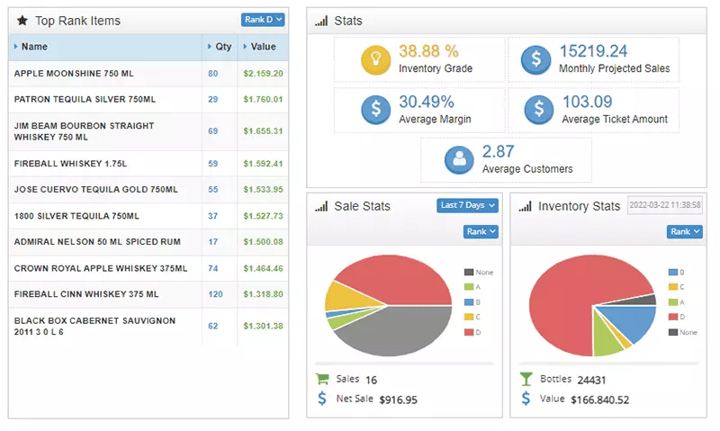

Liquor store owners have to keep track of a wide range of inventory, making powerful inventory management features a must.
Epos Now's lack of case break inventory tracking, mass edits, automated invoicing, and other inventory features make it less ideal for liquor store owners.
Bottle POS also includes some unique ways to improve your selection, such as auto ranking, which uses AI and sales data to rank your products from A to D so you can instantly see what's popular and what's not.
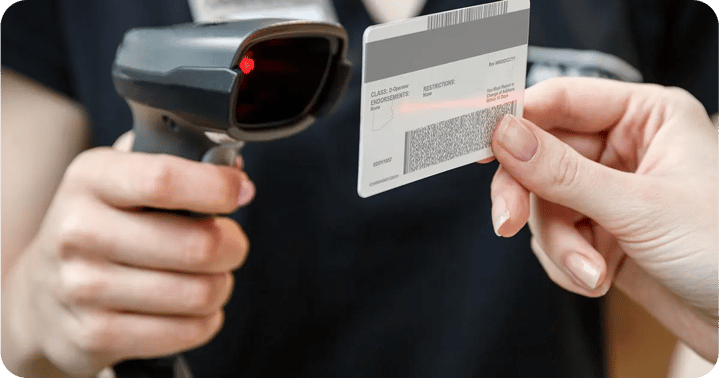
Underage alcohol sales can lead to costly fines and a damaged reputation. However, checking IDs manually can slow checkout lines to a halt — especially when things get busy.
While both systems prompt you to check a customer's age, the option to scan IDs with Bottle POS makes it a safer bet.
Both Bottle POS and Epos Now have multiple pricing tiers that include different functions. However, Epos Now only offers reduced costs for new businesses and on a 12-month contract.
Some functions on Epos Now, like customer loyalty and advanced support, are only available at an added cost.
.png?width=147&height=34&name=POS-Nation-Logo-Main%20(1).png)

