.png?width=147&height=34&name=POS-Nation-Logo-Main%20(1).png)


.webp)


Speeding Up Your Grocery Store Checkout Line: 12 Expert Tips & Tools
Inventory management shapes every part of how a grocery store operates, but it’s easy for things to slip through the cracks — especially for small independent retailers.
Tight budgets and limited staff can make it even more challenging to stay on top of perishable inventory. But that doesn’t mean you need a corporate budget to get things under control.
With the right workflows and habits, you can catch inventory issues early and set your business up for success.
In this article, we’ll cover everything you need to know about grocery store inventory management — from the basics to the tips and tools that make the whole process easier.

What Is Grocery Store Inventory Management?
Grocery store inventory management involves tracking products from the moment you order them to the moment they sell — or, if they don’t sell, the moment you write them off.
Every product moves through the same cycle of ordering and receiving, rotating it onto the shelf, selling it, and then reconciling what’s left against your records.
Grocery store inventory management works differently from general retail in four main ways:
- Tracking expiration dates: You have to sell produce, dairy, meat, and prepared food products within a set timeframe.
- Selling by weight: Deli, butcher, bulk bins, and salad bar items ring up by the pound, and your scale has to subtract the container weight before the customer pays.
- Buying by case and selling by unit: A case of 24 yogurt cups arrives as one line item, but it leaves as 24 separate sales — you need a system that can handle that conversion.
- Managing multiple vendors: On top of your primary distributor, direct store delivery (DSD) vendors and specialty suppliers each add deliveries throughout the week.
Small mistakes in any of these four categories might be easy to miss, but all result in the same thing — product you paid for that customers never ring up.
That’s why a repeatable inventory workflow matters so much for grocery, and what the tips below explore in more detail.
8 Tips for Better Grocery Store Inventory Management
Strengthening your grocery store’s inventory management protocols often comes down to having the right habits and tools for the job.
Here are eight habits worth building into your routine.
1. Rotate Stock by Expiration Date
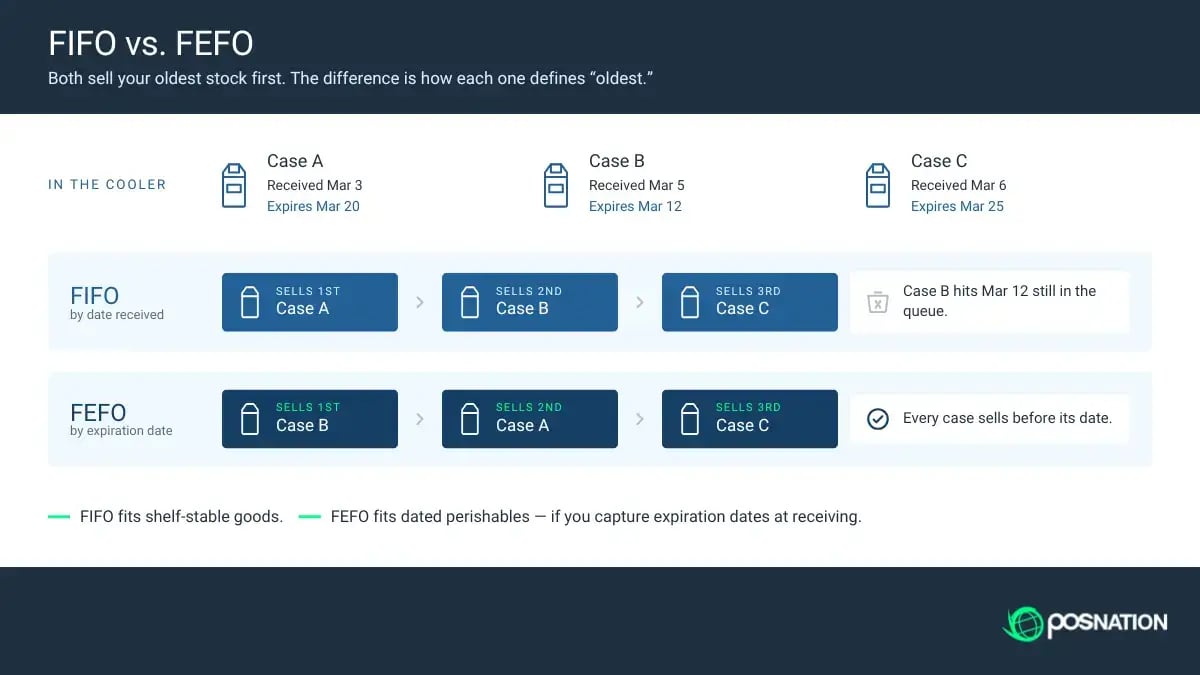
The standard approach for managing perishable goods is the first in, first out (FIFO) method, where you prioritize selling older stock before newer goods.
FIFO holds up best when built into restocking. New product goes behind what’s already on the shelf, and one person per shift owns rotation for their department.
Related Read: 4 Steps to Implementing a FIFO Rotation System in Your Grocery Store
But in practice, arrival order and expiration date may not always match. A Tuesday delivery can carry an earlier date than what came in on Friday, for example, and strict FIFO would push the wrong item forward.
That’s where first expired, first out (FEFO) helps. In dairy, meat, prepared foods, and bakery, it’s best practice to sort by the date actually printed on the package.
Whichever method you choose, the foundation of expiry tracking is product labels with easily readable dates. So, if any printed labels are faint or missing, use a label printer to add your own date code when new product rolls in.
Pro tip: Schedule date checks at the same point in every shift, and tie them to a task someone already does, like shelf cleaning. Rotation that relies on memory alone is quick to slip on busy days.
2. Standardize How You Receive Deliveries
Receiving is where most count problems start — but thankfully, it’s also one of the cheapest places to fix them.
A reliable process comes down to five habits:
- Checking against the purchase order: Verify the count before you sign, and write any short or rejection directly on the invoice. Have the driver sign the correction, too — that paperwork is your proof when you request a credit.
- Logging temperatures on refrigerated loads: The FDA Food Code requires cold TCS foods at 41°F or below on arrival, with shell eggs the notable exception at an ambient 45°F or less. Anything warmer calls for corrective action, which usually means rejecting the load.
- Reviewing costs as well as quantities: About 26% of invoices carry at least one discrepancy, from uncommunicated price increases to charges for product that never arrived. Catching it at the back door lets you fix your shelf price the same week.
- Giving DSD vendors a check-in step: Have reps check in with an invoice before they stock a shelf. Otherwise, their product ends up on your floor without ever reaching your system.
- Entering product the same day: Whatever you don’t log, your system still counts as sitting on your shelf — and your next order gets built off that wrong number.
This last tip is especially important. If you received product on Friday but didn’t enter it into the system until Monday, that leaves you with three days of counts that don’t match your shelves — right through your busiest selling window.
Related Read: Managing Produce Deliveries in Your Grocery Store: 7 Tips
3. Track Sales and Shrink by Department
Every department behaves differently, so storewide shrink numbers only tell you so much — so pull shrink and sales data together rather than separately.
High shrink in a fast-turning department can be perfectly normal, while the same percentage on slow-moving product usually points to over-ordering.
Most of the work here is setup. A grocery point of sale (POS) system should let you group products into departments, then push settings across a whole department at once rather than item by item. Once that structure exists, shrink reports break out on their own.
It gives you a pricing lever, too. Set a target profit percentage per department and the system can suggest a new retail price whenever a wholesale cost moves — an increase nobody catches eats into profit the same way spoilage does.
Pro tip: Set a separate shrink target for each department. A 2% target is aggressive for your deli, and far too loose for dry grocery.

4. Count in Cycles Instead of All at Once
Counting inventory ranks somewhere below mopping on most people’s list of favorite jobs.
But full physical counts happen rarely and often disrupt daily operations, which is why routine cycle counting is so important.
Two of the standard counting methods fit grocery well. Location-based counting rotates through zones or aisles, which maps cleanly onto the departments you already have. ABC counting sorts items by value and movement, so your fastest movers come up most often.
Plenty of stores layer both, counting department by department while hitting the high-value ones more frequently.
Once you’ve settled on a strategy, here are three tips to keep your counts smooth:
- Prioritize by value and movement. Meat and deli earn a weekly count, while shelf-stable center store can wait for the quarter.
- Count between deliveries. Discrepancies show up during movement, so count a department before the next truck arrives.
- Investigate repeat variances. A department that keeps coming up short has a receiving or rotation problem behind it, and adjusting the number just hides it.
Counting from a phone or handheld scanner beats a clipboard and a rekeying session, and some POS systems let you schedule recurring count reminders that push to the register screen or text whoever’s on shift.
5. Set Par Levels From Sales History
A par level is how much of an item you want on hand at any moment, and the standard calculation is average daily unit sales × delivery lead time, plus safety stock.

But for grocery, that last part can get complicated. Safety stock protects you from a stockout, but for perishables, that same buffer can become spoilage. Consider keeping a lighter cushion for produce and meat, and a more generous buffer for shelf-stable goods.
Lead time is the other place par levels go wrong. If you build one around the delivery day your vendor promised, you’ll come up short every time they’re late — which is also why just-in-time (JIT) ordering falls apart in grocery.
It only works if trucks arrive on schedule, and if your Friday delivery sometimes comes Saturday, you’ll have an empty shelf on your best sales day.
Both of those numbers live in your own records, which is where a grocery POS system helps. It can calculate reorder amounts from actual sales instead of a fixed minimum. This is especially useful in departments where the right number shifts weekly or seasonally.
6. Log Every Write-Off With a Reason Code
Every write-off has a cause — spoilage, damage, theft, samples, employee use, donation.
But if nobody records which one, it all lands in the same bucket, and a single shrink number won’t tell you what to fix.
Reason codes solve that. If your produce shrink is high because of trim waste, that’s a prep problem. If it’s high because you over-ordered, that’s a par level problem. Without codes, both look identical on a report, and plenty of grocers assume the difference is theft.
Codes work best when someone logs them while pulling the product off the shelf. Anything recorded hours later, from memory, tends to get the reason wrong.
Most grocery POS systems let you set up as many custom codes as you need and report on them, so you can see which department a problem lives in and what's causing it at the same time.
7. Build a Markdown Ladder for Short-Dated Stock
Even with tight ordering, you may still end up with product approaching its expiration date.
A markdown ladder handles that on a set schedule rather than a judgment call — say 25% off three days out, then 50% the day before.
But perishable markdowns need more care than a clearance rack. A discounted shirt may read as a bargain, but discounted ground beef can read as a warning.
Related Read: Slow-Moving Inventory: 7 Ways To Improve Sales
Shoppers judge whether a price is fair by whether there’s an obvious reason for it, so a “sell by today” tag works better than a generic percent-off sticker. Timing helps, too — meat and seafood move best on evening markdowns, when people are shopping for that night’s dinner.
Here are three other options if markdowns don’t clear that inventory:
- Turn it into prepared food. Produce can become fresh-cut fruit or soup, and proteins can move to a hot bar.
- Donate what’s still safe. Federal law shields good-faith donations to nonprofits from liability, so the risk is smaller than most grocers assume.
- Compost the rest. Anything you can't sell or donate can go to a composting service rather than your regular trash hauler.
All of this depends on spotting product before it’s too late. A good grocery POS tracks expiration dates and flags items while there’s still time to mark them down, and it should print an updated shelf tag whenever you change a price.
Pro tip: Set your markdown schedule by department ahead of time, and experiment with percentages. A 30% discount might work for bakery, while other departments need steeper deals.
8. Keep Your Vendor Records Clean
Good recordkeeping is the foundation of good grocery store inventory management. For vendors, that means listing a main supplier and a backup for every item, so an order can shift to the second when the first comes up short.
It also means tracking what you pay over time. Wholesale costs change constantly, and if your shelf price still reflects what you paid eight months ago, you’re losing money on every sale.
These records also show which vendors raise prices most often, which is useful heading into your next negotiation.
Delivery performance matters, too. How often a vendor comes up short or arrives late tells you how much safety stock that item actually needs.
An industry-specific POS system can keep all of this on the product record itself — every vendor you buy an item from and what each has charged over time.

FAQs: Grocery Store Inventory Management
How often should a grocery store do inventory counts?
Most stores run a full physical inventory count once or twice a year and cycle count continuously in between. Fresh departments warrant weekly counts, while shelf-stable center store can go monthly or quarterly.
What’s the best inventory method for a grocery store?
Most stores combine a few. FIFO or FEFO handles rotation on the shelf, cycle counting keeps your numbers honest, and par levels built on sales history control what you order.
What’s the difference between FIFO and FEFO?
FIFO sells product in the order it arrived. FEFO sells it in the order it expires. When delivery order and expiration order don't line up, FEFO protects you better.
How do you track inventory for items sold by weight?
Deli, butcher, and bulk items need a POS that connects to your scales and subtracts tare weight automatically, so container weight never lands on the customer’s total. Without that, both your pricing and your counts end up wrong.
Get Better Tools for Grocery Store Inventory Management
We’ve covered several strategies and tips for managing inventory at your grocery store, from rotation and receiving to par levels and vendor records. But having the right tech is what makes all of these processes easier.
At POS Nation, we understand that grocery stores deserve industry-specific software. Handling case breaks and selling by weight with automatic tare are everyday necessities, not features to bolt on later.
If you’re ready to strengthen your grocery store’s inventory management, schedule a free, personalized demo with a POS Nation product specialist and see how a system designed for grocery can better support your day-to-day.


With nine years in content marketing and six years specializing in B2B tech, Gina leads the content team at POS Nation. Her expertise spans content writing, SEO, video, graphic design, and email marketing, with deep knowledge of retail technology and point of sale solutions.